When the Control for HDMI function is turned off, sound may not be output from the Sound Bar depending on your TV model. If this is the case, follow these steps to turn on the Control for HDMI function:
HT-A3000
- Press the HOME button on the remote control. The home menu appears on the TV screen.
- Select
 Setup.
 - Select Advanced Settings.
- Select HDMI Settings.
- Select ON.
HT-S400/SC40/SD40
- Press and hold the VOICE button on the remote control for more than 5 seconds.
- When CONTROL FOR HDMI is displayed, select ON by pressing
 (volume) +/- button.
 - Wait until the displayed ON disappears.
HT-X8500
Press and hold the VOICE button of the remote control for five seconds.
You can check the status of the indicators as follows:
When the Control for HDMI function is ON, the HDMI and BLUETOOTH indicators flash.
When the Control for HDMI function is OFF, the Dolby ATMOS and DTS:X indicators flash.
HT-S350/SD35
Press and hold the VOICE button of the remote control for five seconds.
You can check the status of the indicators as follows:
When the Control for HDMI function is ON, the BLUETOOTH indicator flashes twice.
When the Control for HDMI function is OFF, the BLUETOOTH indicator flashes once.
HT-G700
- Press the MENU button on the remote control.
- When SPEAKER is displayed, select HDMI.
- Select CONTROL FOR HDMI.
- Select ON.
- Press the MENU button on the remote control to exit the menu.
HT-S20R/40R
- Press the MENU button on the remote control.
- When CURRENT STATUS is displayed, select HDMI.
- Select CONTROL FOR HDMI.
- Select ON.
- Press the MENU button on the remote control to exit the menu.
Note: If you want to output audio with Control for HDMI turned off, connect the TV and Sound Bar with both an HDMI cable and an optical digital cable.
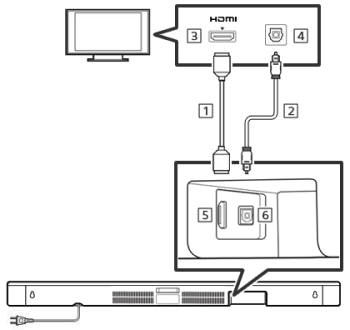
- 1. HDMI cable
- 2. Optical digital cable
- 3. HDMI IN jack on the TV
- 4. Optical Digital Out jack on the TV
- 5. HDMI OUT jack on the Sound Bar
- 6. TV IN (OPTICAL) jack on the Sound Bar
For details, refer to Connecting with a TV section in the Startup Guide of your Sound Bar.