IMPORTANT:
- This article only applies to specific products. Please check the Applicable Products of this article.
- The following models outside of the EU region do not include a 2-way stand, so the Table-Top Stand cannot be repositioned: X80K_X81K_X82K (43-75), X85K_X86K_X89K_85X80K, X90J_X91J_X92J_X93J_X94J (50-75, 100), X85J_X86J_X89J, X79J_X80J_X81J_X82J, XH90_X90H_X91H_XH92 series
Proceed with the appropriate method, based on your TV model.
Notes:
- This operation will require 3 or more people.
- Before you begin, make sure to have the Setup Guide that was supplied with the TV available as a reference.
Choose your TV series:
Ways to change the height or position of the Table-Top Stand
- A95L series (55, 65 inches): You can change the height of the Table-Top Stand.

- A95L (77 inches), X95L, X93L, Z9K, X95K series: You can change the height and position of the Table-Top Stand. The position of the Table-Top Stand can be changed to the outside or inside the position of the TV.

Procedure
- With the TV being held by three or more people, remove the screws from behind the TV, and detach the Table-Top Stand.
Notes:
- As you detach the Table-Top Stand, be careful when lifting the TV because the Table-Top Stand may topple over and cause injury or damage to the TV and the surface that the TV is sitting on.
- Do not remove the Table-Top Stand for any reason other than to install corresponding accessories on the TV.
- Be sure the TV is vertical before turning it on. Turning the TV on with the panel facing down could cause uneven picture uniformity.
- When reattaching the Table-Top Stand, be sure to fasten the screws (previously removed) to the original holes on the rear of the TV.
- The image below is an example. The shape of the Table-Top Stand and the details of the screw attachment may differ slightly depending on the model.

- In order to reattach the Table-Top Stand safely, put a suitably hard material under the TV for support. For example books, old newspapers, or magazines. To reduce the risk of the TV falling, make sure one or more persons continuously hold the TV.

(Unit=cm)
| TV model series name | A | B | C |
|---|
| A95L, X95L, X93L, Z9K, X95K series | 30~40 | Approx. 10 | More than 20 |
|---|
- Reattach the Table-Top Stand.
Note: For detailed instructions on how to attach the Table-Top Stand, refer to the Setup Guide included with your TV.
Ways to change the height or position of the Table-Top Stand
- X90L_X91L series (55, 65, 75, 85 inches) series: You can change the height of the Table-Top Stand.

Procedure
- With the TV being held by three or more people, remove the Table-Top Stand from the TV.
Notes:
- While detaching the Table-Top Stand from the TV or LCD monitor, be careful not to use excessive force and lift the TV carefully. The TV or LCD monitor set or Table-Top Stand may fall or topple over, resulting in personal injury or physical damage to the TV or LCD monitor. It may also cause damage to the surface that the TV is sitting on.
- Firmly hold the Table-Top Stand securely with both hands while the others lift the TV or LCD monitor, and then carefully remove one side of the Table-Top Stand.

- Repeat the process and remove the other side of the Table-Top Stand.
- In order to reattach the Table-Top Stand safely, put a suitably hard material under the TV for support. For example books, old newspapers, or magazines. To reduce the risk of the TV falling, make sure one or more persons continuously hold the TV.
(Unit=cm)
| TV model series name | A | B | C |
|---|
| X90L_X91L (55, 65, 75, 85 inches) | 30~40 | Approx. 25 | More than 20 |
|---|
- Reattach the Table-Top Stand.
Note: For detailed instructions on how to attach the Table-Top Stand, refer to the Setup Guide included with your TV.
Ways to change the height or position of the Table-Top Stand
You can change the height and position of the Table-Top Stand. The position of the Table-Top Stand can be changed to the outside or inside the position of the TV.

Procedure
- With the TV being held by three or more people, remove the screws from behind the TV, and detach the Table-Top Stand.
Notes:
- As you detach the Table-Top Stand, be careful when lifting the TV because the Table-Top Stand may topple over and cause injury or damage to the TV and the surface that the TV is sitting on.
- Do not remove the Table-Top Stand for any reason other than to install corresponding accessories on the TV.
- Be sure the TV is vertical before turning it on. Turning the TV on with the panel facing down could cause uneven picture uniformity.
- When reattaching the Table-Top Stand, be sure to fasten the screws (previously removed) to the original holes on the rear of the TV.

- In order to reattach the Table-Top Stand safely, put a suitably hard material under the TV for support. For example books, old newspapers, or magazines. To reduce the risk of the TV falling, make sure one or more persons continuously hold the TV.
(Unit=cm)
| TV model series name | A | B | C |
|---|
| A80L_A83L_A84L series (83 inches) | 30~40 | Approx. 25 | More than 20 |
|---|
- Reattach the Table-Top Stand.
Note: For detailed instructions on how to attach the Table-Top Stand, refer to the Setup Guide included with your TV.
Ways to change the height or position of the Table-Top Stand
- A80L_A83L_A84L Series (55, 65 inches): You can change the height and position of the Table-Top Stand. The position of the Table-Top Stand can be changed to the outside or slightly inside the position of the TV.

- A80L_A83L_A84L Series (77 inches): You can change the height and position of the Table-Top Stand. The position of the Table-Top Stand can be changed to the outside or inside the position of the TV.

Procedure
- With the TV being held by three or more people, remove the Table-Top Stand from the TV.
Notes:
- While detaching the Table-Top Stand from the TV or OLED monitor, be careful not to use excessive force and lift the TV carefully. The TV or OLED monitor set or Table-Top Stand may fall or topple over, resulting in personal injury or physical damage to the TV or OLED monitor. It may also cause damage to the surface that the TV is sitting on.
- Firmly hold the Table-Top Stand securely with both hands while the others lift the TV or OLED monitor, and then carefully remove one side of the Table-Top Stand.

- Repeat the process and remove the other side of the Table-Top Stand.
- In order to reattach the Table-Top Stand safely, put a suitably hard material under the TV for support. For example books, old newspapers, or magazines. To reduce the risk of the TV falling, make sure one or more persons continuously hold the TV.
(Unit=cm)
| TV model series name | A | B | C |
|---|
| A80L_A83L_A84L Series (55, 65, 77 inches) | 30~40 | Approx. 25 | More than 20 |
|---|
- Reattach the Table-Top Stand.
Note: For detailed instructions on how to attach the Table-Top Stand, refer to the Setup Guide included with your TV.
Ways to change the height or position of the Table-Top Stand
You can change the height and position of the Table-Top Stand. The position of the Table-Top Stand can be changed to the outside or inside the position of the TV.
- A80K_A83K_A84K

- X90K_X91K_X92K_X93K_X94K series (55-85 inches)

Procedure
- With the TV being held by three or more people, remove the Table-Top Stand from the TV.
Notes:
- While detaching the Table-Top Stand from the TV or LCD monitor, be careful not to use excessive force and lift the TV carefully. The TV or LCD monitor set or Table-Top Stand may fall or topple over, resulting in personal injury or physical damage to the TV or LCD monitor. It may also cause damage to the surface that the TV is sitting on.
- Firmly hold the Table-Top Stand securely with both hands while the others lift the TV or LCD monitor, and then carefully remove one side of the Table-Top Stand.
- The image below is an example of the A80K_A83K_A84K series.

- Repeat the process and remove the other side of the Table-Top Stand.
- In order to reattach the Table-Top Stand safely, put a suitably hard material under the TV for support. For example books, old newspapers, or magazines. To reduce the risk of the TV falling, make sure one or more persons continuously hold the TV.
(Unit=cm)
| TV model series name | A | B | C |
|---|
| A80K_A83K_A84K, X90K_X91K_X92K_X93K_X94K (55-85) series | 30~40 | Approx. 25 | More than 20 |
|---|
- Reattach the Table-Top Stand.
Notes:
- For detailed instructions on attaching the Table-Top Stand, refer to the Setup Guide included with your TV.
- For the A80K_A83K_A84K series: The height of the Table-Top Stand can be adjusted by changing the mounting position of the Stand assy. The figure below is a detailed view of Stand Assy and Stand Neck.

- A: Low position: Align Stand Assy to Stand Neck with indication L. Screw Stand Assy to Stand Neck Using Screw PSW M5L14 X2.
- B: High position: Align Stand Assy to Stand Neck with indication U. Screw Stand Assy to Stand Neck Using Screw PSW M5L14 X2.
- With the TV being held by one or more persons, remove the screws from behind the TV to detach the Table-Top Stand.
Notes:
- As you detach the Table-Top Stand, be careful when lifting the TV because the Table-Top Stand may topple over and cause injury or damage to the TV and the surface that the TV is sitting on.
- Do not remove the Table-Top Stand for any reason other than to install corresponding accessories on the TV.
- Be sure the TV is vertical before turning it on. Turning the TV on with the LCD panel facing down could cause uneven picture uniformity.
- When reattaching the Table-Top Stand, be sure to fasten the screws (previously removed) to the original holes on the rear of the TV.

- In order to reattach the Table-Top Stand safely, put a suitably hard material under the TV for support. For example books, old newspapers, or magazines. To reduce the risk of the TV falling, make sure one or more persons continuously hold the TV.
(Unit=cm)
| TV model series name | A | B | C |
|---|
| Z9J series | 30~40 | Approx. 10 | More than 20 |
|---|
| A90J series (55"/65") | 40~60 | Approx. 10 | More than 20 |
|---|
| A90J series (83") | 30~40 | Approx. 10 | More than 20 |
|---|
| X95J series | 30~40 | Approx. 10 | More than 20 |
|---|
-
Reattach the Table-Top Stand.
NOTE: For detailed instructions on attaching the Table-Top Stand, refer to the Setup Guide included with your TV.
- Pull out the Stand from the TV
Note: The image below is an example.
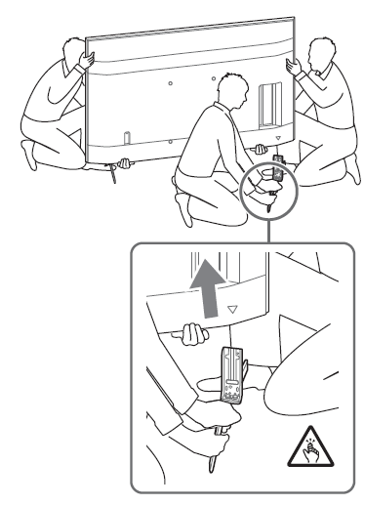
- In order to attach the Stand safely, put a suitably hard material under the TV. For example books, old newspapers, or magazines. To reduce the risk of the TV falling, make sure the TV is held by one or more people.

(Unit = cm)
| TV model series name | A | B | C |
|---|
| A8_A8H series | 40~60 | Approx. 20 | More than 20 |
|---|
| XH95_X95H (55, 65, 75) series | 40~60 | Approx. 25 | More than 20 |
|---|
| XH90_X90H_X91H_XH92 series | Approx. 30 | Approx. 25 | More than 20 |
|---|
-
Attach the stands using the guides below.
Note: These guides are for reference. For more information, refer to the Setup Guide included with your TV.
Choose your model:

