How to connect a Walkman player to a Headphone Amplifier that has a USB Type-C port
This article uses various devices as examples. You can see the applicable Walkman models in the Applicable Products and Categories of This Article.
What you need
Note: Make sure that the cable supports USB On-The-Go (OTG).
- Micro-USB cable: Standard-A-male to Micro-B-male
Note: For the PHA-2A, a Micro USB cable is supplied with the product. - USB cable or USB conversion adapter: Standard-A-female to Micro-C-male.
Connection method
For PHA-2A:
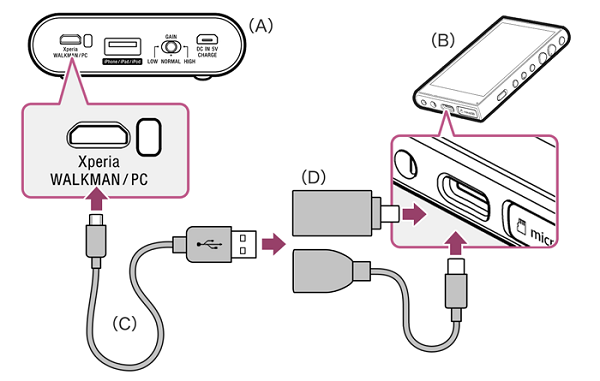
- A: PHA-2A
- B: Walkman
- C: Micro USB cable (supplied)
- D: USB cable or USB conversion adapter(commercially available)
Refer to the following for the connection method.
- Connect a USB cable or USB conversion adapter to the USB Type-C port of the Walkman.
- Connect the Micro USB cable to the Xperia/WALKMAN/PC port of the PHA-2A.
- Connect the USB cable or USB conversion adapter to the Micro USB cable.
Note: The connected Walkman will not be charged even if the USB AC adapter AC-UD20 (sold separately) is used.
For TA-ZH1ES:
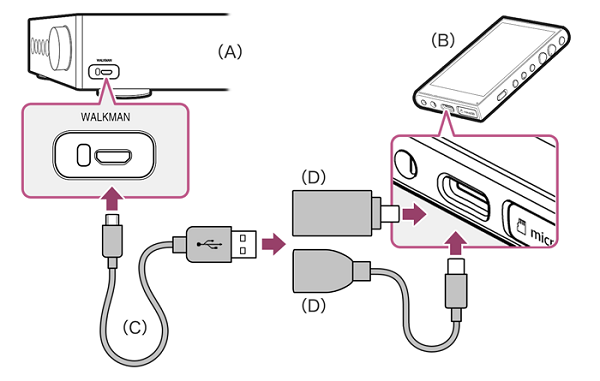
- A: TA-ZH1ES
- B: Walkman
- C: Micro USB cable(commercially available)
- D: USB cable or USB conversion adapter(commercially available)
Refer to the following for the connection method.
- Connect a USB cable or USB conversion adapter to the USB Type-C port of the Walkman.
- Connect a Micro USB cable to the WALKMAN port of the TA-ZH1S.
- Connect the USB cable or USB conversion adapter to the Micro USB cable.
Note: The connected Walkman will not be charged.
Product Repair
Repair information and service assistance
Contact Support
Product support & customer relations
Parts & Accessories
Product information and sales assistance
Chat
Get advise from our agents quickly
Support by Sony
Get Support Content on the Go!


Message us via WhatsApp
Receive advice from one of our online agents